Live Monitoring, Custom Pressure Alerts, and an Honest Update for E5+ Riders
Our TPMS mobile app just got its biggest update yet. You can now watch both tires update in real time on your phone, set your own pressure alerts for each wheel, and match a sensor to a gauge you trust without doing any math. We also have a straight answer for riders on the newest Moto Guzzis — and it isn’t the one we were hoping to give.
Watch Your Pressures in Real Time
The headline feature is Live Monitoring. Open it from the device screen and you get both tires as large, easy-to-read gauges that refresh about once a second — front and rear, with tire temperature and sensor battery underneath each one, and a line telling you how fresh the reading is.
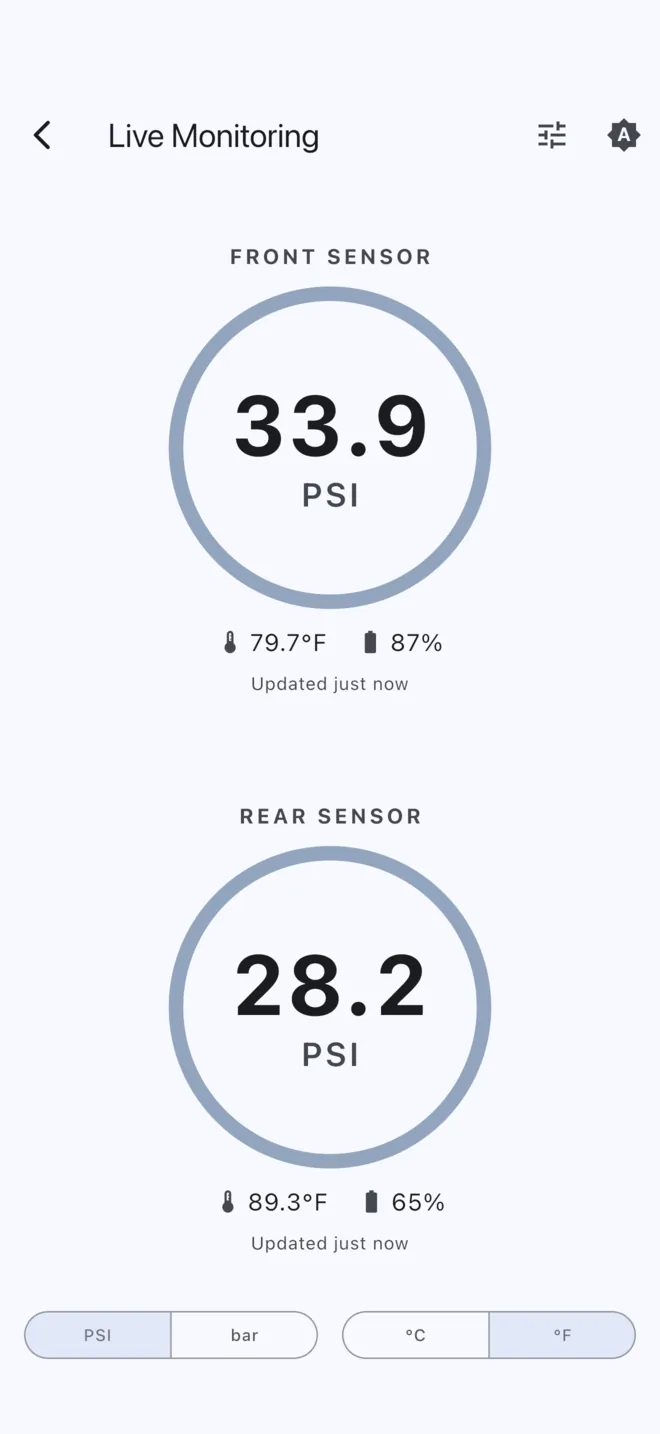
A few details we sweated over:
- The screen stays awake while Live Monitoring is open, so you can leave your phone mounted on the bars without it going dark on you.
- PSI or bar, °C or °F — toggles sit at the bottom of the screen and remember what you picked.
- A light/dark switch just for this screen, separate from the rest of the app. Useful at night, when the last thing you want is a white screen in your peripheral vision.
- Turn the phone sideways and the gauges move side by side.
The gauges also change color on their own: normal, amber once a tire crosses a limit you’ve set, and a pulsing red when it goes well past it. You can read the state without reading the numbers.
Alerts You Set Yourself
Every rider and every bike runs different pressures, so the alert limits are now yours to choose. Tap the settings button in Live Monitoring and set a low and high limit for the front and rear independently. The gauges behind the panel recolor as you type, so you can see exactly what you’re setting up.
When a tire crosses one of your limits, you get a sound and a vibration right away — and if it keeps going in the wrong direction, the alert repeats so a slow leak can’t quietly slip past you. If a pressure hovers right on the line, it won’t nag you every few seconds.
Two things worth knowing up front, because we’d rather you hear it here than discover it on the road: the alert sound follows your phone’s ring/silent switch, but the vibration always fires. And if you’d rather start over, “Reset to defaults” puts the limits back to the same numbers the controller uses for the dash warning.
Calibration That Speaks Plain English
Calibration used to mean nudging an abstract number up and down until the reading looked right. Now it just asks you two questions.
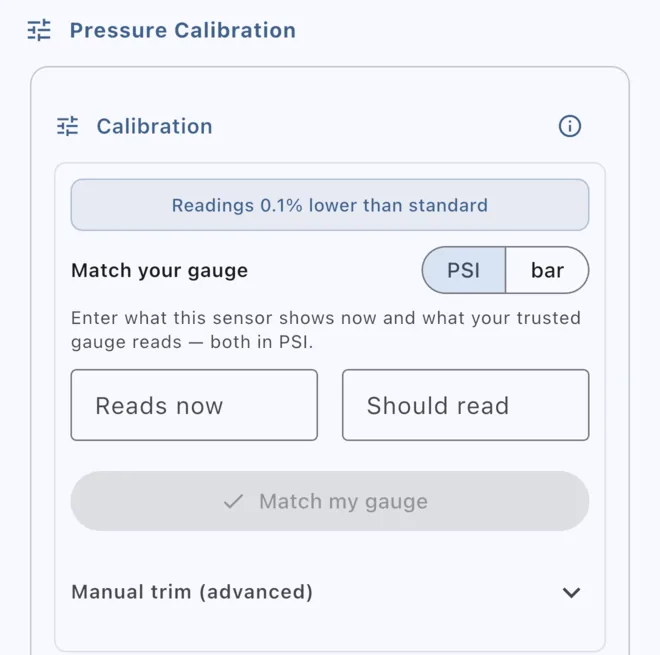
Enter what the sensor reads now and what your trusted gauge reads, tap Match my gauge, and the app works out the correction for you. It shows you what it’s about to do before it does it, and if you try to leave with numbers typed in but not applied, it asks whether you meant to apply them.
The result is displayed as something you can actually interpret — “Readings 2.5% lower than standard” — instead of a raw trim value. And if you’re the sort who wants the raw trim value anyway, it’s still there under Manual trim (advanced). Most riders will never need to touch it.
Smaller Fixes Worth Mentioning
- Tire temperature now reads correctly. If you ever saw a startling
2360°C, that was us, and it’s fixed — it now reads23.6°C, as it always should have. - Sensors no longer briefly disappear from Live Monitoring right after you change a calibration.
- Pressure fields accept both a comma and a period as the decimal separator, which matters if your keypad only offers one of them.
- Gauge values stay centered and no longer crowd the ring on three-digit readings.
One Thing to Check First
Live Monitoring needs your TPMS controller to be on firmware 1.10.0 or newer — that’s the update that lets the controller stream live readings to your phone in the first place. The app checks for you when you connect and walks you through the update, so this is usually a non-issue. If Live Monitoring shows you a “firmware update required” screen instead of gauges, that’s what it’s asking for.
An Honest Update for E5+ Riders
Now the part we wish read differently.
Moto Guzzi’s newest bikes — the 2024-and-later V85 TT and its platform siblings, including the V100 Mandello, Stelvio, and V7 850 — use a new-generation TFT dash. On those bikes, our TPMS adapter causes the dash to display “Alarm TPMS not configured.”
We recently worked directly with a V85 TT E5+ owner to chase this down, and here is what we found. The adapter is wired correctly and works unmodified on E4 and E5 V85 TTs, so this isn’t a wiring problem or a fault in the unit. It’s how the new platform behaves. Notably, Moto Guzzi’s own OEM retrofit TPMS kit shows the same message until a dealer runs a configuration step with their service tool — the 2024 owner’s manual states plainly that the TPMS control unit must be configured by an official Moto Guzzi dealer.
Even with that dealer-side enabling, we have not found a way to make the OEM dash display our sensors. We’re not going to dress that up: as of today there is no workaround we can offer for getting pressures onto the factory cluster of an E5+ bike.
What we can offer is the app — and this is exactly why we built Live Monitoring the way we did. On an E5+ bike, your phone becomes the display: both tires, live, in a format that’s easier to read than the dash readout ever was. It also shows you something the OEM gauge cluster never displays at all: tire temperature. Pressure and temperature tell you rather more together than pressure does alone, particularly on a long hot run or a cold morning start.
If you’re on an E5+ bike and considering our TPMS, please get in touch before ordering so we can make sure you know exactly what you’ll get. Our full fitment notes are on the TPMS product page, and if you’re unsure which emissions standard your bike is, we’re happy to help you work it out — the model year alone doesn’t always tell you.
As Always
The app update is live now on both the App Store and Google Play. If something in it doesn’t work the way you expect, or you’ve got an idea for what belongs in Live Monitoring next, we genuinely want to hear it — contact us or email contact@debyltech.com.
Ride safe, Bastian